Omni-reference in action: MAGI-2 example
MAGI-2 · Release example
MAGI-2 omni-reference lets one request use up to 20 references — up to 10 images, 5 videos and 5 audio clips — to keep characters, places and voices consistent. Here is what that looks like.
What happens in the clip
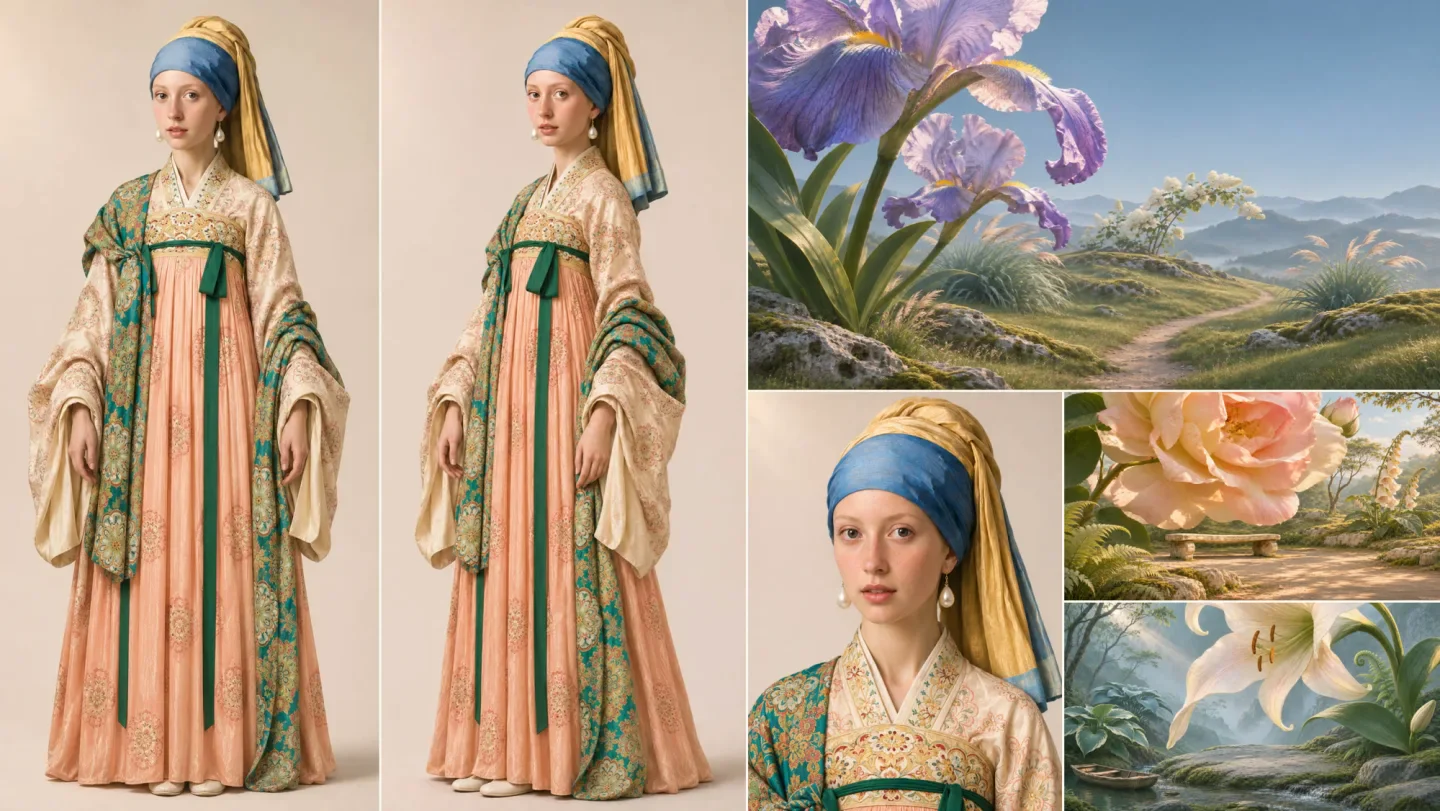
A character walks through giant flower landscapes — an iris hillside, a pink rose garden and a lily valley — while her wardrobe and appearance stay locked to the reference sheet.
What it shows about MAGI-2
One request combined a character reference with several location references. MAGI-2 accepts up to 20 references per request (up to 10 images, 5 videos and 5 audio clips) and keeps identity stable as the scene changes.
Reference inputs
Try this creative direction
Give every reference one job: the character sheet defines identity, each location still defines a place. Use the text prompt for action, camera and mood, and say in which order the places appear.
PRACTICE PROMPT
Use the character from the reference sheet and the three location references. 20 seconds, 16:9. The girl walks from the iris hillside into the rose garden, then into the lily valley, growing tiny among giant flowers. The camera tracks beside her and rises slowly at the end to reveal the whole valley. Keep her outfit, hair and face identical to the reference. Soft wind, rustling petals and a light piano theme.
Use in studio
Run this prompt with MAGI-2 on magi-2.si — 1080p with native sound, 25 credits per second.
References plus story beats, and editing
With character and scene references and only three story beats — no framing, camera angles or cut points — the pre-trained model planned shots, perspective switches and close-ups by itself (prompt enhancement off). MAGI-2 can also edit a chosen part of an existing video while the rest stays stable.
Creator tests
Public MAGI-2 tests published by Chinese creators and tech media before launch. Prompts are translated from Chinese; results vary between generations.
From a character turnaround and a storyboard to a full clip
PROMPT (TRANSLATED)
Follow the shot order and content of the storyboard image to generate the complete video.
Source: Creator test published on WeChat (AI产品阿颖)
Toy-scale hero adventure guided by a reference video
Source: Creator test published on WeChat (数字生命卡兹克)
Mythic short: the Monkey King wakes up
Source: Hands-on test published on WeChat (新智元)
Visual description
A small figure crossing giant flower landscapes; reference images define her look and each location. This description covers the visible action, not a verbatim audio transcript.
 Watch example
 MAGI-2